
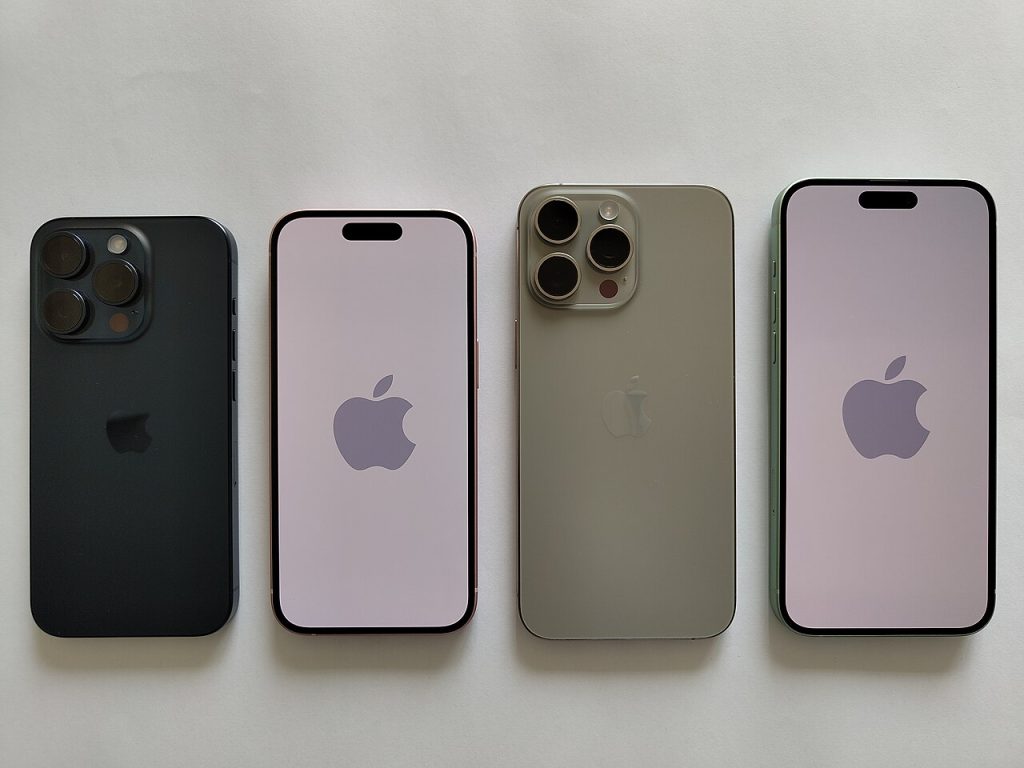
Apple’s four-phone lineups follow a pattern, and the iPhone 15 lineup is a clean example. Two regular models, two Pro models, and a price ladder that nudges you upward one feature at a time. The trick to buying well is knowing which of those features you will actually touch every day.
What the whole iPhone 15 lineup shares
The iPhone 15 generation was the one where Apple moved the whole range to USB-C, ending years of Lightning. That means one cable can charge your phone, laptop and headphones case, and it also made wired accessories easier to find. All four models also use the Dynamic Island, the pill-shaped cutout that expands to show timers, music and live activities, replacing the older notch on the standard models.

Every model has a capable main camera and a 48 megapixel sensor, which lets the phone combine pixels for cleaner low-light shots or crop in on a scene without much loss. Basic crash detection and satellite emergency features are present across the range too. So even the cheapest phone in the iPhone 15 lineup is no stripped-down compromise.
The standard pair: 15 and 15 Plus
These two are the same phone in two sizes. The 15 has a roughly six-inch display and the 15 Plus has a bigger roughly 6.7-inch one, with a larger battery to match. The chips are last-generation silicon borrowed from the previous Pro phones, which is still plenty fast for apps, games and photo editing.
What you give up is mostly refinement. The screens refresh at 60 Hz rather than the smoother adaptive rate on the Pro phones, the frame is aluminum rather than titanium, and you get two rear cameras instead of three. If you mostly message, browse, shoot family photos and stream video, you will not feel deprived. The Plus is the pick for people who watch a lot on their phone and want battery life without paying for Pro hardware.
Storage is the other decision in the iPhone 15 lineup that affects the price more than people expect. Photos and video fill a phone quickly, especially if you shoot in the higher quality modes. If you keep most pictures in cloud storage, a smaller tier is fine. If you record a lot of video and want everything on the device, step up one tier rather than living with constant “storage full” warnings.
The Pro pair: 15 Pro and 15 Pro Max
The Pro models move to a lighter titanium frame, a newer chip, and a display that can ramp its refresh rate up to 120 Hz. Scrolling feels noticeably fluid once you have used it, and it is the upgrade people tend to say they cannot go back from. The Pro phones also swap the mute switch for a programmable Action button, which can launch the camera, a shortcut, a flashlight or a focus mode.
Photography is the other dividing line in the iPhone 15 lineup. The Pro phones have a third rear camera, and the Pro Max uses a longer telephoto lens with a tetraprism design for stronger optical zoom. If you photograph kids at recitals, wildlife, or anything you can’t walk closer to, that lens matters. If your pictures are mostly food, friends and pets at arm’s length, it largely does not.
Other Pro extras include faster data transfer over the USB-C port and better video features for people who edit footage on the phone. These are real benefits, but for a small slice of buyers.
A quick way to choose from the iPhone 15 lineup
- You want the best value and a pocketable phone: the iPhone 15.
- You want a big screen and long battery life without the Pro price: the iPhone 15 Plus.
- You care about smooth scrolling, a lighter frame and a flexible camera system: the iPhone 15 Pro.
- You want the longest zoom and the largest display: the iPhone 15 Pro Max.
Two practical notes before you pay. First, a phone from the iPhone 15 lineup will keep receiving software updates for several years, so an older model bought at a discount is not a dead end. Second, think about accessories you already own: because the whole lineup uses USB-C, chargers and cables from a recent laptop or tablet will likely work, which can offset part of the cost.
If the phone is one piece of a larger upgrade, you might also read how a smart ring really costs after the sticker price, or how a good keyboard changes daily typing. Both make the same point: the purchase price is only part of what a gadget costs you. For the specs of each handset, Apple’s own iPhone site lists current models side by side.
Buying one now
Since this generation is no longer the newest, you may find good prices from carriers, refurbishers and resellers. A few checks help. Confirm the storage size, since the base tier fills up fast if you shoot video. Check battery health on any used unit, which you can see in the settings menu. And make sure it is unlocked or compatible with your carrier before you pay.
Also consider how long you keep phones. Apple tends to support iPhones with software updates for many years, so a phone from this generation should stay current for a good while. If you hold devices for five years or more, spending a little extra on a Pro model for the faster chip and better screen can be a reasonable bet. If you swap phones every couple of years, the standard models give you most of the experience for less.
Pick from the iPhone 15 lineup for the one feature you will notice daily, and let the rest go. For most people, that is either the screen smoothness or the zoom lens, and the answer is usually obvious after thinking about how you really use your phone.
Image: IPHONE 15 / Wikimedia Commons, CC BY-SA 4.0.



